herdr-nono-plugin
Documentation: https://schemaitat.github.io/herdr-nono-plugin/



A Herdr plugin that runs OpenCode inside nono sandboxes, one agent per pane.
OpenCode first. The plugin is built and tested for OpenCode 2.x: its sandbox layout, profiles and verification follow OpenCode's client/server split. Other agents can be configured as custom agents, but they run in a single sandbox and are untested.
Get started
1. Install
Needs Linux (kernel 6.7+), Herdr 0.9+, nono 0.78+ and OpenCode 2.x signed in to a provider. Nothing else runs at runtime: the plugin is one binary (no Node.js).
nono pull nolabs-ai/opencode                                          # the nono profile pack the plugin builds on
herdr plugin install schemaitat/herdr-nono-plugin
herdr plugin action invoke doctor --plugin nono.sandbox               # checks nono and tries to escape a test sandbox
herdr plugin action invoke install-keybindings --plugin nono.sandbox  # adds the chords below
Herdr's install runs scripts/install-binary.sh, which downloads the release binary for your machine
(x86_64 or aarch64 Linux), checks its sha256 and installs it as bin/herdr-nono. If there is no
release for that version yet, or no network, it builds from source instead, which needs
Rust (cargo). To retry, run sh scripts/install-binary.sh in the plugin
directory; see Getting started for the details.
2. Start an agent
Open Herdr in a project, focus a pane and press prefix+shift+a
(prefix is ctrl+b by default). A new pane opens with the OpenCode TUI.
Press prefix+shift+o to see the agent's client and server sandboxes and
every process running in them. After quitting OpenCode, prefix+shift+b
resumes the conversation.
3. Check the profiles
The sandbox policy lives in two nono profiles, one per sandbox. To see which ones are active, where their files are and what they allow:
- In Herdr:
prefix+shift+o, thenifor the profiles view. doctorprints the plugin root (the shipped profiles are in itsprofiles/), the config directory and one line per resolved profile.nono profile listlists every profile nono knows by name, user profiles in~/.config/nono/profiles/;nono profile show <name|path>prints one fully resolved.
To change or extend them, see Profiles.
4. What the sandbox allows by default
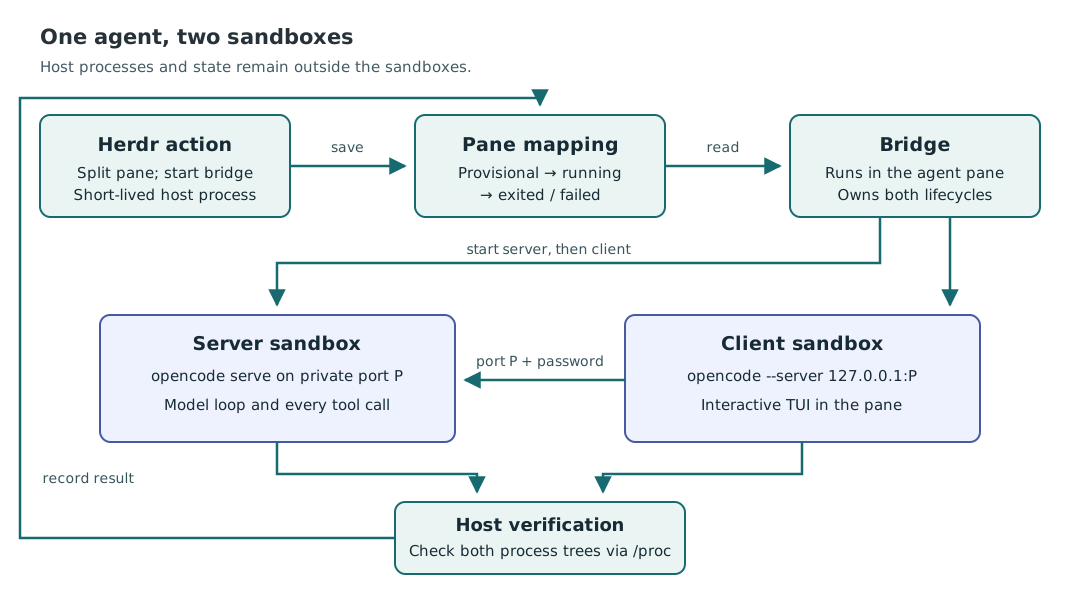
OpenCode runs every tool call in its server, not in the TUI, so each agent gets two sandboxes: a server sandbox (OpenCode's private server and every tool it runs) and a client sandbox (the TUI).
| Server sandbox: server and tools | Client sandbox: TUI | |
|---|---|---|
| Project files | Read-write: the worktree or git repository of the focused pane | Same |
| Rest of the filesystem | Only what OpenCode needs (its config and state, toolchains, /tmp); not your home directory, not ~/.ssh |
Same |
| Internet | HTTP(S) to GitHub Copilot and OpenCode's model catalog only, through nono's proxy | None |
| Localhost | None, so not the unsandboxed OpenCode service on :4096; only its own port for the client |
Only its server's port |
| SSH, databases, UDP | Blocked; use HTTPS git remotes | Blocked |
| Herdr, systemd, D-Bus, SSH and GPG agents, clipboard | Blocked | Blocked |
After each launch the plugin checks from outside, through /proc, that every
process is confined and that the TUI talks to its own sandboxed server. If
either check fails, it stops the agent. To change these defaults, see
Profiles; for what the sandbox does not cover (your
workspace, shared OpenCode config), see Security.
Why sockets are blocked
Herdr, systemd, D-Bus, the SSH and GPG agents and Docker all take requests
over a Unix socket, a file such as ~/.config/herdr/herdr.sock. A process
that can connect to one can ask that service to act for it, outside the
sandbox: through Herdr's socket, herdr pane run <pane> <command> runs any
command in a real, unsandboxed pane.
File permissions alone cannot stop this. nono grants directories, and the
sandbox may write /tmp and your workspace, so it could reach any socket in
them. Both shipped profiles therefore set
"linux": { "af_unix_mediation": "pathname" }. With it, nono's supervisor,
which runs outside the sandbox, checks every connect() and bind() on a
Unix socket and refuses each one the profile does not list under
filesystem.unix_socket. The socket file stays visible, but connecting fails
with Operation not permitted, so herdr pane run fails before Herdr
receives anything. Without the setting, the same command reaches Herdr.
Keep this setting in every profile you write. To let the agent use one
socket, list it under filesystem.unix_socket instead of removing the
setting. doctor and test/integration-sandbox.test.mjs check it; details in
Security.
Key bindings
| Chord | Action | Does |
|---|---|---|
prefix+shift+a |
start-agent |
Start OpenCode in a new pane, server and client sandboxed |
prefix+shift+o |
sandboxes |
Open the sandboxes overlay: every agent, its client and server sandbox, their processes; enter shows an agent's details, g jumps to its pane, a cleans up all, ? lists the keys |
prefix+shift+b |
reconnect |
Resume the conversation in fresh sandboxes |
prefix+shift+s |
open-shell |
Open a shell under the server's policy, the one the tools run under |
Documentation
- Getting started · Key bindings · Sandboxes overlay · Working with agents
- Profiles: see the active profiles, change them, or extend them with your own
- Security: what the sandboxes stop for OpenCode, and what they do not
- Configuration · Actions and scripting · Troubleshooting
- Design · Development · Changelog
Status
Version 0.1.0. Verified with Herdr 0.9.1, nono 0.78.0 and OpenCode 2.0.22 on
Linux 7.0. Not verified on a real host: the worktree.removed hook, custom
agents, macOS (not declared in the manifest).
License
Apache-2.0. See LICENSE and NOTICE. Structure and much of the plumbing are adapted from herdr-sbx-plugin, the Docker Sandboxes counterpart, whose action names, key bindings and result line this plugin keeps.